Sunday, June 23, 2024
Motorola Edge 50 Ultra 5G | Nordic Wood | Sleek Design, Powerful Performance!
Unboxing and Design
Saturday, June 8, 2024
Vivo X Fold 3 Pro 5G Unboxing & First Impression | Snapdragon 8 Gen 3 and Camera Test by Hi5Boutique
Vivo X Fold 3 Pro 5G Unboxing & First Impression | Snapdragon 8 Gen 3, BGMI Gaming Test, Fold Test, Benchmarks and Camera Test by Hi5Boutique
Title: Vivo X Fold 3 Pro Unboxing and Review: Fast Charging, Snapdragon 8, and More
CLICK TO BUY NOW - Vivo X Fold 3 Pro 5G
Unboxing the Vivo X Fold 3 Pro
Design
Ultra-Reliable
Key Features
Snapdragon 8 Gen 3 Processor
India's 1st Fold with Snapdragon 8 Gen 3 Mobile PlatformTSMC 4 nm process and its upgraded architecture bring new breakthroughs in performance and energy efficiency.
AnTuTu Score 26
2.12 Million
CPU Performance 26
30%
CPU Energy Efficiency 26
20%
RAM Type
LPDDR5X
GPU Performance 26
25%
GPU Energy Efficiency 26
25%
UFS 4.0 Read Speeds 2
Brightness and Display
India's Biggest Battery in Fold17
Equivalent 5700 mAh
Super slim, super large, and super fast charging.
The combination of hardware and software extends battery life, alongside software optimization for ultra-low power consumption and ultra-long standby.
Music Playback
72 Hours
Youtube Videos
22.5 Hours
Online Meeting
6.5 Hours
Carbon Fiber
Impact-Resistant Film
More effective protection.
Armor Back Cover UPE Fiber + Glass Fiber
Additional Specifications
The video transcript briefly mentions other notable specifications of the Vivo X Fold 3 Pro, including:
Thursday, April 20, 2023
i8 pro max smartwatch
i8 Pro Max Smartwatch
Smart watch manual-
Adapt to platform requirements:
Android 5.0 and above mobile phones
IOS 9.0 and above mobile phones
Support Bluetooth BT 3.0
Initial Use:
To ensure the normal use of the watch, please charge it first.
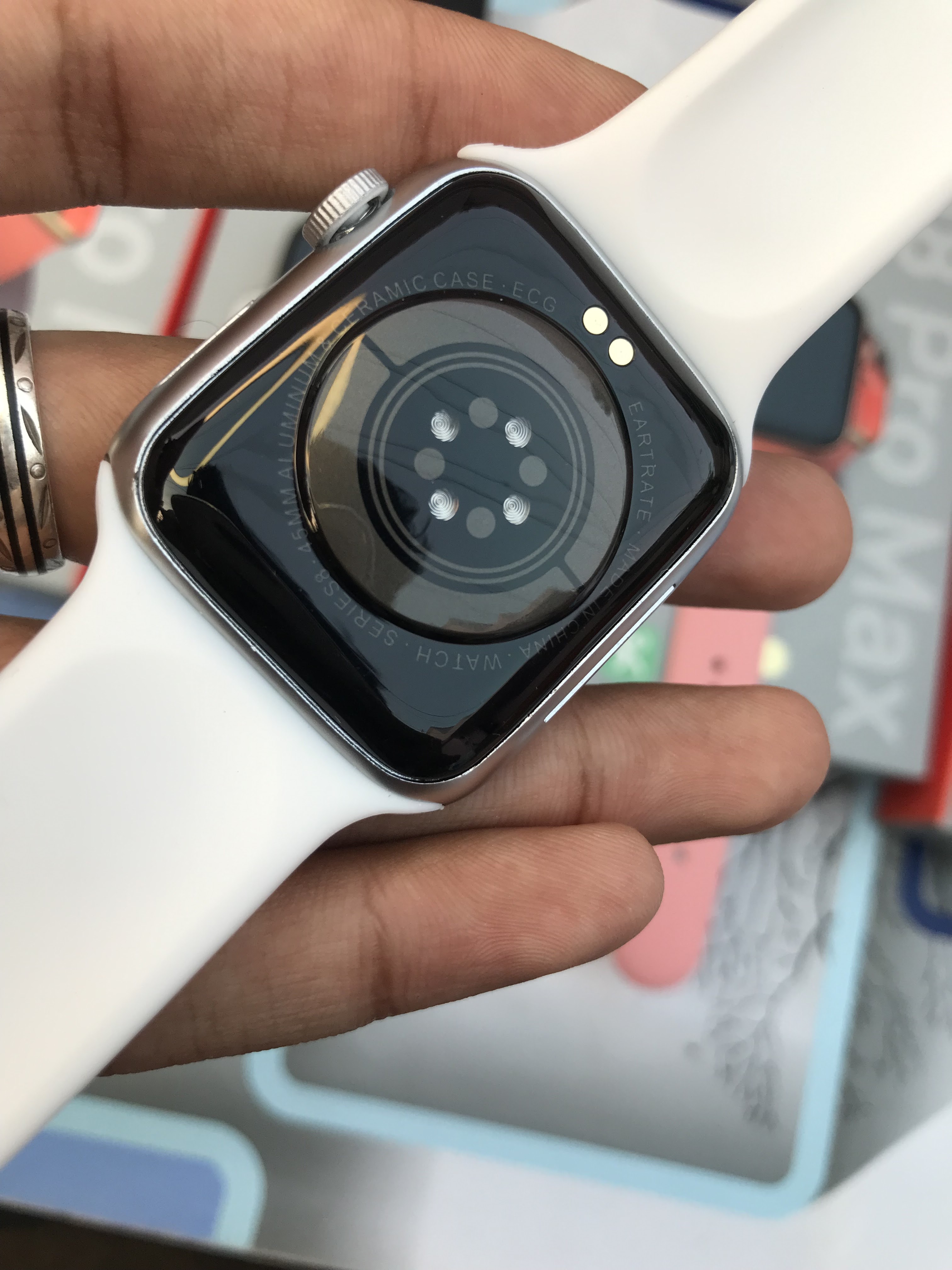
The contact of the charging clip connected to the power supply can be charged with the contact on the back of the watch.
Buy Now - Click To Buy Now
Watch and APP connection:
The permissions during the APP installation process are fully agreed upon, and the watch and the mobile phone must be connected to the APP and the mobile phone Bluetooth to achieve all functions.
APP connection method: open the APP and mobile phone Bluetooth, The app reminds you to enable the notification point to confirm. Click to add a device, search for the device name and click connect to the watch device.
Mobile phone Bluetooth connection: Bluetooth must be turned on on the watch side, enter the mobile phone Bluetooth, search for the Bluetooth device of the model name and click Connect to pair.
A simple solution to common Bluetooth problems: Due to the lack of uniformity in the Bluetooth protocol of various mobile phone brands, sometimes the Bluetooth connection between the mobile phone and the watch may be unstable. You can turn off the Bluetooth of the mobile phone and reconnect it again, or reset the watch to the factory settings, as The watch is in a dead state, you can press and hold the power button for 10 seconds to restart the watch.
How to connect BT 3.0
Bluetooth: Enter the Bluetooth terminal of the mobile phone and search for Hry3.0 binding.
How to verify that the Bluetooth connection is successful: The Bluetooth icon in the upper left corner of the main menu is oval to indicate that the Bluetooth connection is successful.
Use the watch to click to find the phone or enter the APP to find the watch. If there is vibration, it means that the APP is connected successfully.
If the watch has an incoming call, there is no notification reminder on QQ WeChat, you need to set the phone settings-notification settings, open the corresponding application and open the notification application to receive information notification.
Watch operating instructions:
Power button: Up key: short press to enter the menu and return, down key: wake up/turn off the screen and long press for power on and off and restart.
Clock interface: Swipe left and right on the dial interface to preview or switch dials, and swipe down to enter the message notification list.
Watch function introduction
Standby interface: Enter the standby interface.
Dial pad: Connect to the mobile phone to dial out via Bluetooth, and you can make a call on the watch side.
Contact: After the bracelet is successfully connected to the app, you can add a contact in the app.
After the contact is successfully added, the phone book of the bracelet will be displayed synchronously. Click the contact in the phone book on the bracelet to make a call.
(Note: The bracelet needs to Connect mobile phone Bluetooth).
Call record: can display the call record of the wristband, click the phone number to dial.
Information: The content of the message push can be displayed, such as QQ Wechat, etc. (The system
above IOS12 will block SMS reminders by default).
Movement: Enter the sports mode (running, walking cycling, mountain climbing) selection interface,
Click again to start the data monitoring of the corresponding
sports mode: exercise time, distance,
calories burned: Pedometer: Calculate your step count data for the day, clear the data at 00:00 in the morning, and view it in the APP.
Sleep monitoring: Turn on sleep detection to monitor the quality of sleep while sleeping.
Sedentary reminder: Set the sedentary time, the bracelet will vibrate when the time is up, and the interface will display a reminder.
Heart Rate: Put the watch close to your wrist, and the best place to wear it is on the upper arm of the wrist bone. The real-time heart rate can be measured. The normal value of the average person is 60-100 beats/min.
Blood Pressure: Put the watch close to your wrist, the best place to wear it is the wristbone above the arm, You can measure the real-time blood pressure, adult diastolic.
Blood pressure: 60 - 80(mmHg) adult systolic blood pressure: 100-120(mmHg).
Blood oxygen monitoring: The watch is tightly attached to the wrist, and the best wearing position is on the wrist bone and above the arm The real-time blood oxygen value can be measured. The normal range of the value is generally 95% to 100%.
Bluetooth camera: When the phone cannot be locked, the watch enters Bluetooth to take a photo
When the app interface is opened, the phone will automatically pop up the camera interface, Click on the watch to take a photo, and the phone will take a photo and store the photo on the phone; or open the APP, Enter the remote interface, and the watch will also take photos when you shake the watch.
Bluetooth Music: Control to play music on the phone.
Find the phone: when the watch is connected to the mobile phone, tap the watch side to find the mobile phone, tap the watch side to find the mobile phone, long press the magnifying glass icon, and the mobile phone bell will ring.
Weather: Display the current weather temperature in degrees.
Stopwatch: Start stopwatch timing and end timing.
Alarm bell: You can set a custom alarm clock on the APP, and the watch will vibrate to remind you of the point.
Settings: You can set to turn on or off the vibration and raise the wrist to brighten the screen.
Style: You can set and change the UI style.
About: Display the MAC serial Code, Bluetooth name and version number of this device.
Brightness: can set the brightness size and backlight off time.
QR code: QR code downloaded by mobile APP.
Reset: Let your device reset and clear data, such as pedometer sleep, etc.
Flashlight: Turn on the flashlight function, and the screen of the bracelet will be bright and white.
Raise your hand to brighten the screen: After turning on the raising of your hand to brighten the scream when you wear the bracelet, the screen will light up when you raise your wrist, and it will turn off when you put it down.
Language: After connecting to the App, you can set the App, you can set the language on the APP side and the language can be synchronized to the watch after setting, or switch synchronized to the watch after setting, or switching the language on the watch side, that is, it will also be synchronized to the app side.
Dail push: Enter the app end dial function, and you can view any dial and lock dial; you can also push DIY
dials and dial malls to the watch end.
Dual Mode switch: BT switch, enter the mobile phone system to search and connect Hry3.0 after it is turned on and disconnect it when it is turned off.
Precautions for use:
Not suitable for bathing and swimming.
Please connect the watch when synchronizing data.
Use the built-in charging cable to charge.
Do not expose the watch to high moisture, or extremely high or extremely low temperatures for a long time.
Watch maintenance:
Do not scratch the sensor, protect it from damage. You can wipe the surface of the watch with a damp cloth, and use mild soap and water to remove oil or dust.
Do not expose the watch to an environment with strong chemical substances, such as gasoline, cleaning solvents, propanol, alcohol or insect repellent, and chemical substances will damage the sealing of the watch and the surface of the case.
Avoid your watch from being exposed to strong shocks and extreme heat exposure.
This product does not support IP68 waterproofing, does not support rain, hand washing, swimming wear, hot showers or saunas, etc., can not be worn, and cannot prevent water vapour. If the watch is damaged due to water ingress due to use in violation of the instructions, our company will not provide a free warranty.
Common problem:
Can’t find the watch?
Answer: Because the Bluetooth broadcast of the watch has not been searched by the mobile phone, please make sure that the watch is powered and activated, and is not connected to other mobile phones. Move the watch close to the mobile phone and search again. If it still does not work, turn off the Bluetooth of the mobile phone and turn it on again after 20 seconds. Bluetooth searches again.
1. Is the Bluetooth connection always on?
2. Will there be any data if it is turned off?
Answer: Before synchronizing the data, the exercise and sleep data will remain on the watch host.
When the watch is successful, the watch will automatically upload data to the mobile phone, but the data stored by the watch is limited. It can only store Bluetooth data for about one week. When the space is full, the oldest data will be automatically overwritten to generate the latest data, so please sync your watch to your phone in time.
Note: If the call and SMS reminder function is turned on, you need to keep the Bluetooth connection, and the alarm clock reminder5 supports offline.
What should I do if the watch cannot be charged?
1. Please make sure that the direction for the charging stand is correct and that the charging clip is in good contact with the watch.
2. When the power of the watch is lower than
3. 5V, there will be a period of battery
charging time.
Remarks: It will enter the charging state immediately after the charger is plugged in. If there is no display, you need to charge for 3-5 minutes to enter the charging state.
Will the watch cause harm to the human body if worn for a long time?
Answer: The radiation of the equipment is much lower than the FCC standard of the United States,
which is basically negligible. Long-term wearing will not cause radiation damage to the human body.
Note: The reverse contact point will cause the battery to short-circuit.
App Download method:
IOS/Android phone users: Scan the above QR code to download and install the application.
Android: Search for ‘Hryfine’ through the software application store to download and install the
application.
Apple: Search for ‘HryFine’ through the app store to download and install the app.
Android: Search for ‘HryFine’ through the Playstore to download and install the app.
WeChat: Follow the official account ‘Deer Enjoy Plenary”, You can get the download link to download on the official account.
Saturday, January 21, 2023
HW8 Ultra Original iWatch
Tuesday, September 6, 2022
Please Join Us For A Special Event From Apple Park
Apple iPhone 14 14Max 14Pro 14Pro MAX, iWatch Series 8, New Airpods Launching This Event ( 7 SEPTEMBER 2022 AT 10:30 PM IST. ) Don't Miss To Watch - CLICK
Saturday, July 9, 2022
Nothing Phone (1) Price in India 2022 Full Specifications & Launch Date
Nothing Phone (1) Price in India 2022
Full Specifications & Launch Date
Nothing Phone (1)
You’ve seen the design. Heard about the Glyph Interface. And met our parrots. Finally, the parts are all coming together. And there's even more. Get the full Phone (1) experience in 3 days. Nothing Event: Return to instinct. 12 July, 16:00 BST.
History Nothing
In 2020, Carl Pei, the co-founder of OnePlus
was working with the company alongside Pete Lau
Pei announced his resignation on October 16, 2020, so that he could start a new
venture. Pei later raised up to $7 million from multiple investors to
start up his venture including iPod inventor Tony Fadell, Twitch co-founder
Kevin Lin, Reddit CEO Steve Huffman, and YouTuber Casey Neistat
Pei announced the company, Nothing, on January 27, 2021
On February 15, 2021, Nothing acquired the Essential Products trademarks and brand
nearly a year after the company shut down operations.
On February 25, 2021, the company announced its first founding
partner, Teenage Engineering, to
produce the design aesthetic of the brand and its products.
Nothing announced its first product on July 27, 2021, named the
"ear (1)", which are wireless headphones
On October 13, 2021, the company raised up to $50 million and
also announced a partnership with Qualcomm
On March 9, 2022, the same day that Nothing secured Series B
financing, the company announced that it would hold a press conference on March
23During that event, the company announced its first smartphone, the
"phone (1)"
NETWORK Technology
GSM / HSPA / LTE / 5G
LAUNCH Announced Exp. announcement 2022, July 12
Status Rumored. Exp. release 2022, July 22
BODY Dimensions 7.6 mm thickness
Weight 199 g (7.02 oz)
Build Glass front, aluminum frame
SIM Dual SIM (Nano-SIM, dual stand-by)
Multiple LED lights on the back (notifications, charging progress, camera fill light)
Blinking red light on the back (video recording indicator)
DISPLAY Type OLED, 120Hz
Size 6.55 inches, 103.6 cm2
Resolution 1080 x 2400 pixels, 20:9 ratio (~402 ppi density)
PLATFORM OS Android 12, Nothing OS
Chipset Qualcomm SM7325-AE Snapdragon 778G+ 5G (6 nm)
CPU Octa-core (1x2.5 GHz Cortex-A78 & 3x2.4 GHz Cortex-A78 & 4x1.8 GHz Cortex-A55)
GPU Adreno 642L
MEMORY Card slot No
Internal 128GB 8GB RAM, 256GB 8GB RAM, 256GB 12GB RAM
UFS 3.1
MAIN CAMERA Dual 50 MP, f/1.8, (wide), PDAF
16 MP, f/2.2, (ultrawide)
Features LED flash, panorama, HDR
Video 4K@30fps, 1080p@30fps
SELFIE CAMERA Single 16 MP, f/2.2, (wide)
Video 1080p@30fps
SOUND Loudspeaker Yes, with stereo speakers
3.5mm jack No
COMMS WLAN Wi-Fi 802.11 a/b/g/n/ac/6, dual-band, hotspot
Bluetooth 5.2, A2DP, LE
GPS Yes, with A-GPS, GLONASS, GALILEO, BDS
NFC Yes
Radio Unspecified
USB USB Type-C 2.0, USB On-The-Go
FEATURES Sensors Fingerprint (under display, optical), accelerometer, proximity, gyro, compass
BATTERY Type Li-Po 4500 mAh, non-removable
Charging Fast charging 33W, 50% in 30 min
Wireless charging 5W
Reversed wireless charging
MISC Colours White, Black
Models A063
Tuesday, April 12, 2022
Thalapathy Vijay Rolls Royce Fun Ride with The 'Beast' Team | Nelson, Po...
BEAST
Vijay
Indian actor
Joseph Vijay Chandrasekhar, known mononymously as Vijay, is an Indian actor, dancer, playback singer and philanthropist who works predominantly in Tamil cinema and also appeared in other Indian languages films. Vijay is the highest paid actor in South India.Pooja Hegde
Indian actress
Pooja Hegde is an Indian actress and model who appears predominantly in Telugu films, in addition to a few Hindi and Tamil films. She was crowned as the second runner-up at the Miss Universe India 2010 competition. She made her acting debut with the Tamil film Mugamoodi.Sun Pictures
Production group
Sun Pictures is an Indian film distribution and production studio based in Chennai, India. It is a unit of Sun TV Network a part of the Sun Group. Founded in 2000, it started producing the TV film Siragugal and later it started producing and distributing Tamil-language filmsNelson Dilipkumar
Indian director
Nelson Dilipkumar, credited in films as Nelson, is an Indian director and screenwriter who predominantly works in Tamil cinema. His films are known for featuring elements of black comedy. Nelson won the Best Screenplay Award in Norway Tamil Film Festival for his directorial debut Kolamaavu KokilaMonday, February 21, 2022
Apple Watch Series 7 Unboxing & Review | Tamil
Apple Watch Series 7
Featured Post
HI BOUTIQUE WELCOME
DRESS
-
i8 Pro Max Smartwatch Smart watch manual- Adapt to platform requirements: Android 5.0 and above mobile phones IOS 9.0 and above mobile phone...
-
🔥*SCROLL BUTTON WORKING*🔥 *I Watch Seires 6*🚀 *Model - W26 +* ( 2 Pin Magnetic Charger & Full Display With Calling Feature ) • SCROLL...


.png)

.png)


.jpg)